


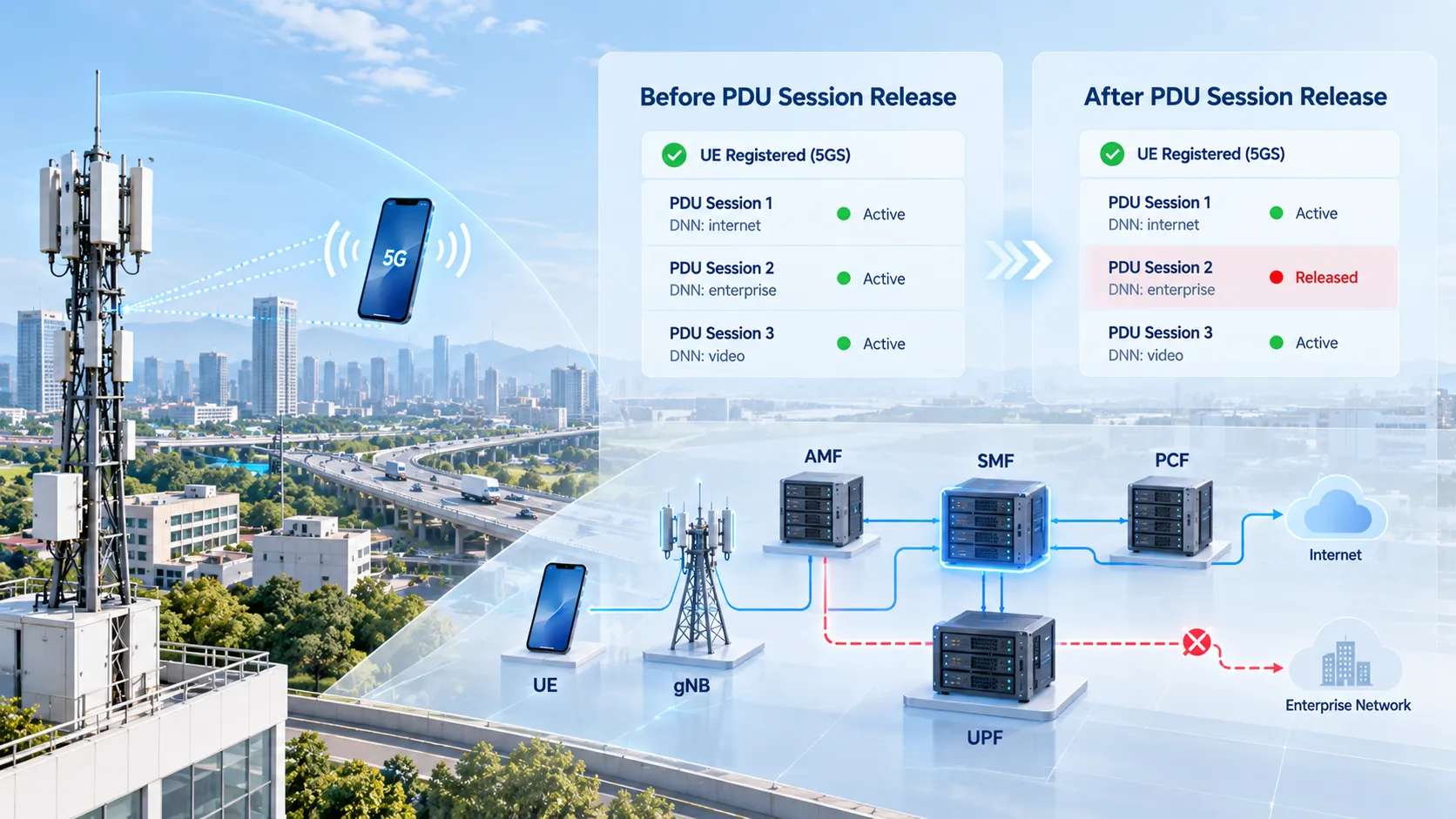
An established PDU Session may already be carrying traffic through a gNB and UPF when the UE requests disconnection or the network decides to terminate it. PDU Session Release removes that session and its associated resources. For an IP-based session, those resources include the allocated IP address or prefixes; access resources, UPF state and policy relationships also require the applicable cleanup.
The SMF coordinates session release, while the AMF handles access and mobility signaling and relays session-management information. Releasing one PDU Session does not, by itself, deregister the UE or release its other sessions. The useful question in a trace is therefore which session is ending, why it is ending, and which resources still exist for it.
The main example below is a single-access PDU Session over 3GPP access, in a non-roaming or local-breakout deployment. It follows 3GPP TS 23.502 V18.9.0, clauses 4.3.4.1 and 4.3.4.2. Home-routed roaming, multi-access sessions and specialized access arrangements have additional rules. Even within this example, an inactive user-plane connection or an unreachable UE changes the expected signaling.
Session Release, Access Release and Deregistration
| Procedure | Purpose | What the result means |
|---|---|---|
| PDU Session Establishment | Create a new session in the initial-establishment case | The UE gains a session toward a data network. |
| PDU Session Modification | Change an existing session, such as its QoS rules or flows | The session continues with updated parameters. |
| PDU Session Release | Terminate the selected session | That session's resources are released; other sessions may remain. |
| AN Release or user-plane deactivation | Release access connections or deactivate the session's access user plane | The PDU Session can remain established in the core. |
| 5GS Deregistration | End registration for the applicable access scope | Registration and related session handling follow the deregistration branch. |
An RRC Release or NGAP UE Context Release is therefore insufficient evidence of PDU Session termination. Likewise, a RAN report that session resources have been released does not force the SMF to delete the session: the SMF can retain it with the user-plane connection deactivated.
For the preceding lifecycle stages, see the PDU Session Establishment procedure and the PDU Session Modification procedure. Their focus is creating or changing connectivity; release analysis follows the removal of an existing session.
Who Controls N1, N2 and N4?
Several messages contain the words “PDU Session Release,” but they have different endpoints and confirm different actions. Keep the session-management payload separate from the transport carrying it.
| Path | Endpoints and handling | Release evidence |
|---|---|---|
| N1 and N1 SM | N1 connects the UE and AMF. The 5GSM session-management messages are created and processed by the UE and SMF; the AMF relays their containers. | PDU Session Release Request, Command and Complete, when the explicit NAS exchange applies. |
| N2 | The AMF and NG-RAN exchange NGAP signaling. SMF-generated N2 SM information reaches the RAN through the AMF. | PDU Session Resource Release Command and Response for access resources that need release. |
| N4 | The SMF controls the UPF using PFCP. | PFCP Session Deletion Request and Response for the corresponding UPF session. |
N3 is the user-plane path between the gNB and UPF. Removing its session-specific tunnel resources is different from exchanging a release command on N2 or deleting a PFCP session on N4. The AMF does not send PFCP commands to the UPF.
What Triggers PDU Session Release?
A UE request is only one entry point. The first event may instead be a policy decision, a state mismatch or another network condition:
UE request: the UE sends PDU Session Release Request for the selected PDU Session ID.
PCF trigger: SM Policy Association Termination requests session release through the SMF.
SMF decision: local policy or information from functions such as the DN, UDM or CHF requires the session to end.
AMF request: a session-state mismatch or an applicable slice-related condition requires cleanup. The service operation depends on whether further N1/N2 signaling is needed.
RAN resource report: the RAN reports released resources, for example after all associated QoS Flows have been released. The SMF decides whether to deactivate the user plane or release the session.
PDU Session Release Command identifies the instruction sent toward the UE, not necessarily the original trigger. To distinguish UE-requested and network-requested cases, inspect the events before that command and the cause information carried between the relevant functions.
A UE-Initiated Release with Active Access Resources
Assume PDU Session ID 5 has an active user-plane connection, the UE is reachable, and the SMF accepts its release request. This is a useful reference case, rather than a mandatory packet list for every release.
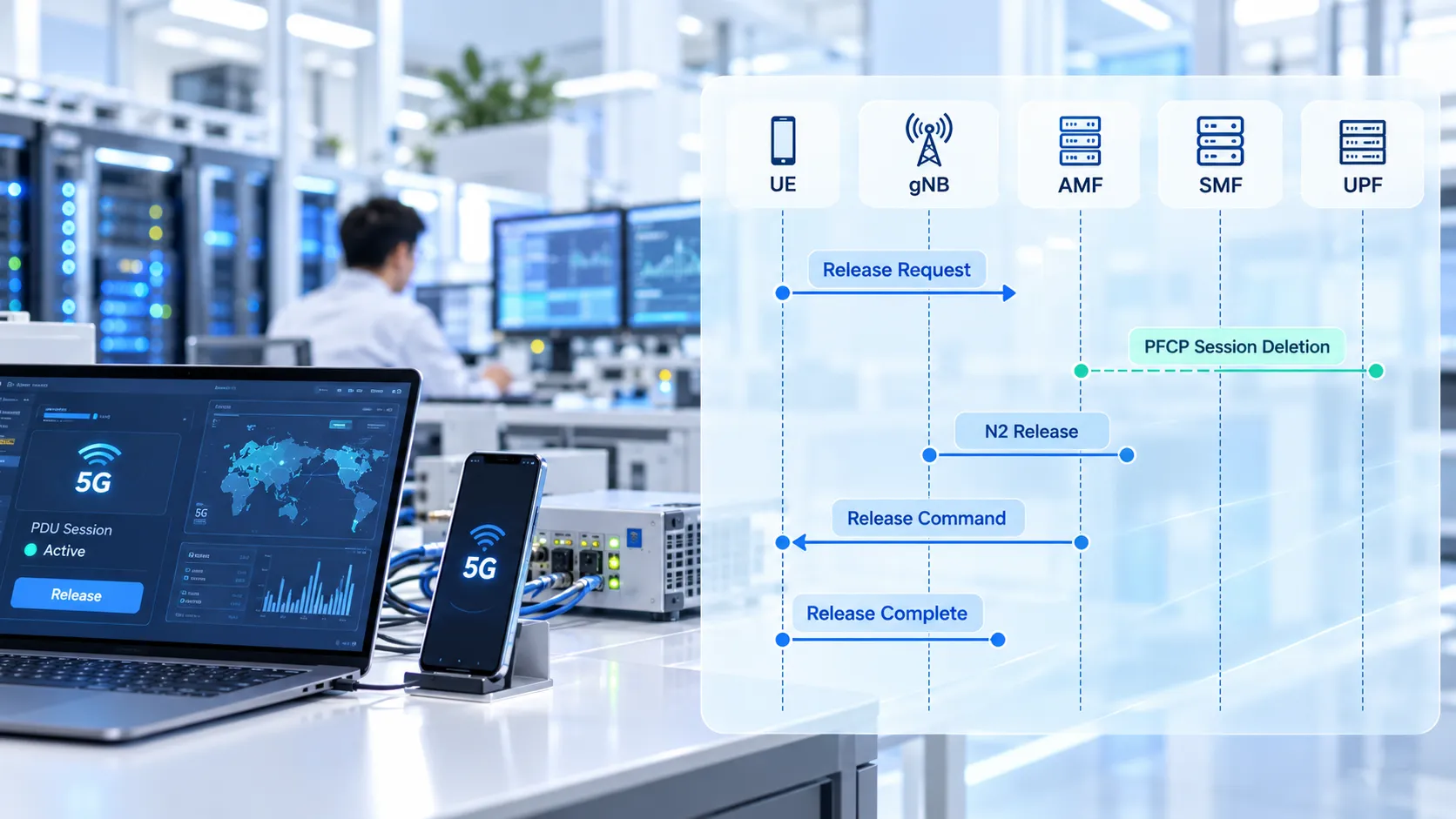
The UE requests release. It sends PDU Session Release Request in the NAS transport procedure. Over NG-RAN, the gNB conveys the NAS message to the AMF using NGAP uplink transport. The NAS UL NAS Transport message and NGAP Uplink NAS Transport are different protocol layers.
The AMF forwards the request to the serving SMF. It invokes
Nsmf_PDUSession_UpdateSMContextfor the existing context, carrying the N1 SM information. It does not create a new SM Context.The SMF releases the session's user-plane resources. In this reference flow, the N4 release stage precedes the N1/N2 release information. The SMF initiates PFCP Session Deletion toward the involved UPF, which responds with the result. With multiple UPFs, one exchange is not enough to account for every affected N4 session.
The SMF supplies N1 and N2 information to the AMF. Its UpdateSMContext response carries PDU Session Release Command for the UE and, because the user-plane connection is active in this example, N2 SM resource-release information.
The AMF requests access-resource release. It sends NGAP PDU Session Resource Release Command to the gNB. When the command contains a NAS PDU, the gNB passes it to the UE. The gNB releases the specified access resources and returns PDU Session Resource Release Response.
The UE confirms the NAS release. On receipt of the single-access PDU Session Release Command, it considers the session released and sends PDU Session Release Complete. The AMF forwards this N1 SM response to the SMF.
The SMF completes the relevant context cleanup. After receiving the required replies, it notifies the AMF of the released SM Context and performs the applicable policy and subscription-related cleanup.
The UE confirmation can reach the core before the RAN resource-release acknowledgment. TS 23.502 explicitly allows those response stages to occur in either order. A trace should not be marked faulty merely because Release Complete appears before the N2 response.
The actual NAS confirmation name is PDU Session Release Complete. Some stage-2 diagrams label it “PDU Session Release Ack.” TS 24.501 V17.7.1, clauses 6.3.3 and 6.4.3 supplies the NAS message behavior, including acceptance, rejection and abnormal cases. An accepted UE request proceeds through the network-requested NAS release procedure, which is why a Release Command follows the Request.
When the Network Uses a Different Release Branch
SMF or PCF Initiation
When the SMF or PCF starts release, there is no initial UE Release Request. The SMF normally uses Namf_Communication_N1N2MessageTransfer to deliver the release information through the AMF. N2 resource-release information is included when the session's user-plane connection is active; it is omitted when that connection is already deactivated.
If a CM-IDLE UE needs to receive the NAS command, the AMF can initiate the network-triggered Service Request procedure. However, applicable delivery-skip conditions or a prior indication that the UE is unreachable allow the network to continue without the ordinary UE-facing exchange. Later Service Request or Registration signaling can synchronize session status. Missing Release Complete is therefore a fault indicator only after the expected branch and delivery result have been established.
AMF-Initiated Context Cleanup
Nsmf_PDUSession_ReleaseSMContext applies to cases such as a UE/network session-status mismatch where neither N1 nor N2 SM signaling is needed before context release. It is not the universal AMF operation for every session release. If further signaling is required, the AMF can instead use Nsmf_PDUSession_UpdateSMContext with a release indication.
These operations concern a session context. The separate AMF purge procedure concerns retained subscriber and mobility-management context after deregistration. An AMF purge result does not prove that a particular UPF session was deleted.
What Resource Cleanup Must Account For
UPF Sessions and Forwarding Rules
PFCP Session Deletion removes the selected PFCP session and its associated rules, such as applicable PDRs, FARs, QERs and URRs. A successful Response can also carry pending usage reports. Check the response cause: the mere presence of a response is not proof of successful deletion.
TS 29.244 V18.7.0, clause 6.3.4 distinguishes successful deletion from “Session context not found.” For the latter, compare the PFCP identifiers, previous transactions and UPF restart history before deciding whether the record was already removed or the wrong context was addressed.
Where several UPFs serve the PDU Session, follow each relevant N4 session. Shared infrastructure does not disappear just because one session ends: release targets the associated resources, and shared resources can remain while other sessions still need them.
Access, UE and Core Session State
The RAN releases resources requested by the applicable N2 procedure. If those resources were already absent, a fresh N2 release exchange may not be needed. On the explicit NAS path, UE state is updated through the Release Command and Complete exchange. On a skipped-delivery or unreachable-UE path, immediate confirmation from the UE is not a prerequisite for network-side cleanup.
For the branches that use it, Nsmf_PDUSession_SMContextStatusNotify tells the AMF that the SM Context is released. The AMF removes the session's association with the serving SMF and related session information; this does not imply removal of the UE's entire registration context.
Dynamic policy control requires the associated SM Policy Association termination. UDM cleanup also has distinct scopes: removal of the SMF's registration for the released session differs from unsubscribing to subscription-data changes. In the cited release flow, the unsubscribe condition is the last PDU Session that this SMF handles for the UE and the associated DNN/S-NSSAI combination. It is not a rule to delete all subscriber data when any session ends.

Verifying Release in Signaling Traces
Start with the UE identity and session lifecycle, then correlate the PDU Session ID with the SM Context reference, NAS transaction information and the relevant UPF PFCP identifiers. A PDU Session ID alone is not a network-wide unique key. Record the trigger, access state and capture coverage before judging missing packets.
| Observation | Next check |
|---|---|
| The UE has stopped passing data | Check whether the session ended, its user plane was deactivated, or forwarding failed. Loss of traffic alone does not distinguish them. |
| Release Complete is present, but UPF state remains | Match the exact PFCP session, deletion response cause and all involved UPFs. Check for an earlier failed request or a newly established session. |
| PFCP deletion succeeded, but RAN resources remain | Determine whether N2 release was required, then inspect delivery, the RAN response and current resource state. |
| Release Command or Complete is absent | Check UE reachability, the delivery-skip indication, AMF operation and trace visibility before declaring NAS failure. |
| Repeated Release Requests or Commands appear | Correlate the NAS procedure transaction identity and timers with delivery results. Separate retransmissions from a new release attempt. |
| Policy or UDM state remains | Check which association or subscription belonged to this session and whether another valid session still requires it. |
A successful individual response confirms its own protocol operation. End-to-end verification combines those results with the final state of the resources that actually existed. If a capture omits an interface, report that part as unobserved and use the corresponding function's logs or state inspection to close the gap.
FAQs
Can the network reject a UE-requested PDU Session Release?
Yes. TS 24.501 defines PDU Session Release Reject when the SMF does not accept the request. Inspect its 5GSM cause and the corresponding UE handling; sending a Release Request does not guarantee that the normal Command/Complete exchange will follow.
Why does a new session appear immediately after release?
Check whether Release Command carries 5GSM cause #39, “reactivation requested.” In that case, the UE should initiate establishment again with the applicable characteristics of the released session. That new establishment is a separate lifecycle event, not evidence that deletion of the old session necessarily failed.
Does deleting a PFCP session also disconnect the SMF and UPF?
No. PFCP Session Deletion targets an individual session. The node-level PFCP association is separate and can continue supporting other sessions between the same control-plane and user-plane functions.